Society

24-Hour Party, People?

pub

pub (Photo credit: Pretty/Ugly Design)

It’s been ten years this months since I moved into this apartment and eight years since pubs were allowed to open pretty much when they liked as long as the council let them.

I have mixed feelings about this, I enjoy a good night out as much as anyone else.  Ten years ago in this town we had pubs that shut at eleven and two clubs you could go to afterwards, I went to one of them every friday night, then across to the chippy for some food then wandered home.  Good times.

Now we have pubs open till two in the morning and no clubs, at all, just a dancefloor in the corner of a couple of pubs usually serviced by a mobile disco that is far too loud for the venue.  It just isn’t the same experience.

Then there’s the noise problem.  24-hour drinking was meant to stop people bingeing at ten to eleven, getting totally slaughtered and being anti-social on the way home.  It doesn’t seem to have reduced the fighting, or the shouting or the kicking down of walls it’s just moved it to two o’clock in the morning.  If I’ve been out myself it doesn’t bother me I’ll fall asleep anyway but when, like last friday, I need to be up early the next morning it’s a pain in the proverbial to not be able to sleep until gone two in the morning because of the noise of people screaming at each other outside the pub opposite followed by people walking home from town screaming at each other.  It’s even worse in summer because you have to keep the windows shut to reduce the racket and as such can’t sleep anyway.  It’s a lose-lose situation and you wake up next morning, ten minutes before you’ve got to get out the door and feel lousy.

Ten years ago I could leave my windows open in summer and be asleep before the loud-mouths returned from the clubs, or simply join them if I could afford to wake up at eleven the next morning but now it’s not so simple and with every passing summer I’m less convinced that the experiment has worked.

Standard
Psychology, Tech

An Object Choice

NYC - MoMA: Philip Johnson Architecture and De...

NYC – MoMA: Philip Johnson Architecture and Design Galleries – Digital Compact Disc (Photo credit: wallyg)

I have always generally stuck to buying CDs for music except for some recent digital download-only EPs and singles but the other day I was made to wonder why.

I’d been looking at an album that was available as a normal version and a deluxe version.  The deluxe had just three more songs but cost £17 as opposed to the normal version that had dropped to £5.  I thought I’d just go without the extra tracks and bought the £5 one.  All fine except that I’d noticed that there was a link to “download the MP3 version for £4.99” on the deluxe edition yet I’d still bought the physical CD of the normal version for 1p more.  At first I was fine with this but then began to feel confused, I felt a bit daft for buying the CD when by downloading I could have had more for the same money – was the plastic and paper really worth it?

I could have cancelled the CD, downloaded the MP3 but I still didn’t.  I’m still at the stage where I only feel that I have a copy of the music (or book) that I can keep forever if I have a physical copy – for me it’s not even about the cover artwork or the booklet as I hardly ever look at these.  But this experience, the doubt, showed me that even I’m accepting that the future of media is becoming more digital, increasingly virtual, that with digital booklets having the actual CD is less important than the music itself.

In many ways it’s better this way, content you effectively license can be accessed anywhere you can log into your account, a copy can be downloaded to your computer if necessary and even burned onto an old-fashioned disk.  Should the worst happen you don’t lose your collection.  It’s also more convenient to buy and store.

I’m still not so sold on ebooks though, I still like a paper book I can safely read in the bath but I suppose it’s only a matter of time before the waterproof Kindle Touch.

And as for my MP3 quandary, it turned out that the download wasn’t even the deluxe version after all so the decision was entirely virtual, ironically.

Standard
Architecture, Tech

Give Me Shelter

Afghan Former Refugees at UNHCR Returnee Camp

Afghan Former Refugees at UNHCR Returnee Camp (Photo credit: United Nations Photo)

Refugees the world over being looked after by the United Nations currently only have basic tents to call home, often for years, and these structures that provide little protection from cold and heat and it’s for this reason the UNHCR (UN High Commission for Refugees) has recruited our favourite flatpack furniture maker to bring things into the 21st century.

The Ikea Foundation’s designers have come up with a framework which is covered by lightweight insulated panels which reflect daytime sunlight and retain heat at night.  They can be put up in a matter of hours and last up to three years.

The shelters are to be tested in Ethiopia next month and the UNHCR is looking to incorporate solar-charged lighting in the design.

Click through to Gizmodo UK for pictures of the shelter.

[Ikea via Gizmodo UK and Fast Company]

Standard
Business, Marketing, Tech, Uncategorized

Ad-Free or Not Ad-Free, That is The Question

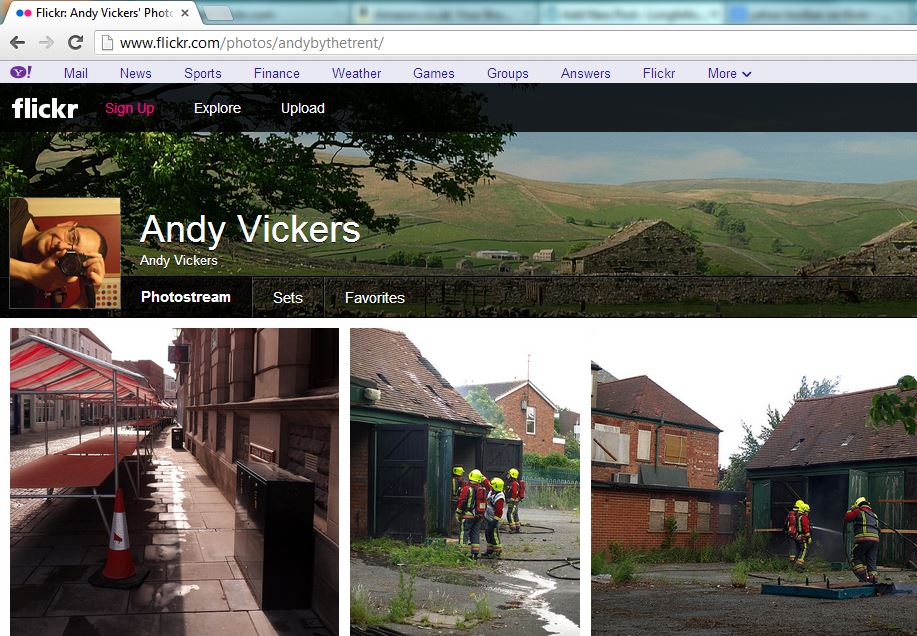
Yahoo Bar on Flickr

Yahoo Bar on Flickr

The home of my other creative endeavour is over at Flickr, a site that many say has been left to stagnate under the ownership of Yahoo mainly because it didn’t become the kind of social network that Facebook is.  The thing is that it started out as a photo sharing site and it still is, the recent makeover improved how your photostream was presented to viewers and in general it was still doing its job as an online portfolio of photos.

Today though something odd has happened and the Flickr community as a whole is not happy.  Me included.  The facelifted interface had a nice grey toolbar across the top, it was all very clean and modern looking, very professional, but today something else appeared, a lilac bar – referred to now by forum members as the Y! Barney Bar – displaying links to other Yahoo sites and services.

As many commenters have said it looks like something from a nineties website, wedged between your browser’s chrome and the elegant Flickr interface, a distracting layer of pink nougat taking up screen space and cheapening the experience for your viewers.  The thing that has annoyed most people though is that many of us pay to have an ad-free interface both for our own use and for those viewing our photos but this amounts to an advert for Yahoo’s services, driving viewers to the ad-land that is Yahoo’s main site, to gather more revenue.  Yahoo staff have said that “The idea is to make it easier to access other places in the Yahoo! network and make visiting Yahoo! pages a more seamless experience.” and that it brings your photos to a wider audience.  If that’s the case add another menu item to Flickr’s own toolbar not this monstrosity.

Many users have pledged to leave altogether if it’s not removed immediately but most think it’s unlikely because Yahoo are copying Google’s trend of having the toolbar at the top of everything, but at least Google’s bar fits in.  What you’re paying for on any site like Flickr or our home here at WordPress is the avoidance of your content being juxtaposed with adverts which may detract from what you’re trying to say or the aesthetics of your site, to make it feel like your own space not part of a larger corporate behemoth, that is what the Yahoo bar makes Flickr feel like – just a part of a search engine and internet portal, it takes the shine off the presentation, makes it feel less special.

Some commenters have said that at least this hasn’t happened to the sites of our blogging brethren over on Tumblr – but as Yahoo haven’t had much time with its new purchase as yet perhaps it’s only a matter of time.

[Flickr Forums]

Standard
Tech, Uncategorized

Tracing Lost Tech

MSI laptop computer

MSI laptop computer (Photo credit: Wikipedia)

We’ve had the ability to track, locate and remotely disable stolen cars and vans for a while but attaching the tracker to your laptop just wasn’t practical but now, thanks to our increasingly connected world it’s becoming possible.

Today it’s inevitable that, unless it’s stripped down for parts, a smartphone, tablet or laptop will connect to the internet somehow and it’s then that modern tech can call home for help.  Smartphones can be equipped with apps – iPhones have the Find my iPhone feature which can be used to track and remotely wipe a stolen, or lost phone – for Android you have apps like Where’s My Droid, Android Lost and Plan B all of which can be used to find and wipe them too.  All of these apps have varying features but they include providing GPS coordinates, alarms, taking photos with the camera, activating the ringer (in case it’s nearby) and preventing apps being changed – in case someone has stolen it and tries to get rid of the tracker.  Plan B is different in that it is installed to the phone after it’s stolen – you download it to your phone via the web access version of the Play store and once installed it sends its location to your Gmail account.  This last one made possible by the cloud integration of devices these days and being able to send to your device rather than loading things onto it.

For laptops you can do similar things with apps like Prey which can track your device via IP addresses, you can view webcam shots to try to identify a culprit or location, you can lock the computer remotely, change wallpaper, display warnings and notices and wipe browser data, which is fine unless the thief has already wiped the computer.

Digital cameras can be located roughly by searching for their serial numbers online.  How this works is that if someone takes a photo with your camera and uploads it to a photo sharing site or anywhere else that preserves the metadata – all the information on which camera and lens took the photo and what settings were used – then you should be able to find it by matching the serial number stored in the photo.  Again it will only provide clues as to who has your gear, the police would have to approach the website hosting the images to get any details of who uploaded them.

Information from all these sources can be provided to the police to investigate, it’s never wise to try to track down the person who has your gear, sometimes it could work out bad for you or you might end up accusing someone who innocently found or bought the thing.

One thing to remember is to mark gear if possible with your phone number – never your home address as this can show a thief that A) you have expensive kit in your house and B) you’re not at home right now, and they know where you live.   On cameras and phones take a picture of a piece of paper with your phone number and possibly a message saying that if they’re reading the message it means that the device has been lost or stolen and asking them to contact you – a thief would delete this of course, if they noticed it.

Another tip is to photograph all your kit, log the serial numbers and store this information securely both online and printed if possible, again this can help to locate, identify and most importantly return your tech to you.

As many people have said though, as the chances of getting the actual device back are often slim, the best use of most of these apps is simply to wipe or disable the device, making it either unusable to the thief, making their life difficult, or at the very least removing your personal data – which could in so many ways be more valuable to them which is another good reminder to set a strong login password on your PC too.

Updated:  I’ve just been sent a link to an entertaining tale of why you shouldn’t steal a hacker’s computer – it’s worth a watch, even if you’re not a techy person and shows how even not having a login password can have it’s uses [YouTube]  Many thanks Alasdair.

[Lifehacker has more advice here]

Standard
Psychology, Society, Tech

Windows 8 – A Tale of Love and Hate

Accessori Hardware mouse tastiere e webcam inn...

Accessori Hardware mouse tastiere e webcam innovative per Microsoft Windows 8 presentazione milanese press day esclusiva – 25 (Photo credit: Michele Ficara Manganelli)

Most people will by now be aware at least of Microsoft’s latest platform for playing Angry Birds on – Windows 8 – but some may not be aware of the controversy it caused.

It was a radical change in how people operated windows and this annoyed many who were familiar with the Windows 95 to Windows 7 era as gone were the familiar start button and desktop in favour of the flat, unadorned, information-heavy tiled interface. The comments weren’t simply of dislike, many they were downright venomous – from the likes of “Microsoft are idiots” to “Microsoft have killed the PC” and worse.

It’s pleasantly colourful, not garish like the Windows XP “Fisher Price” look of ten years ago.  The thing is that many of these complaints seem more about resistance to change than anything, the Start Menu alone for example – that had been made slightly redundant in Windows 7 by the ability to dock apps to the taskbar, a lot of people ran apps by hitting the Start button on the keyboard and typing the name of the app – this is how Windows 8’s start screen works by default, the only thing that’s changed is, in effect, the size of the menu which is now a screen full of information.

I remember the last time Microsoft radically changed how Windows worked – Windows 95.  The same arguments came out, “how can this Start menu replace Program Manager, how will you find programs”, “look at how much screen space the “taskbar” takes up”, “why do you press Start to shut down the computer, that’s stupid” and so on.  Ironically the new Start Screen reminds me of the old Windows 3.1 way of working more.

The flat tiled interface reflects how computers are being more familiar and how they’re used, thanks to the modern web’s design users no longer need the reassurance of buttons that look like real objects simply an area of a different colour or a label to indicate an action.  Yes Microsoft is designing to appeal to consumers but these days it has to, more computer users than ever are home users and Apple have been doing the same simplification to target the same market for years.  The difference is that whereas Apple tries to lock down parts of its operating systems so that non-technical users can’t do anything to affect the “user experience” i.e. make the product look slow or faulty, Microsoft and Google still allow tweaking if that’s your thing.

We’re seeing similar arguments about the new Xbox which is being turned into a media hub for the home rather than just a games console, there are complaints about its appearance and so on.  Many of the complainers in both cases simply don’t like the idea that the PC and the Xbox are no longer theirs, the domain of the gamers and the techies, no longer mysterious to consumers.  There’s a side issue to this feeling of ownership over an area of technology – the sometime horrific online treatment of women who play games by male gamers who think it’s not a “girl thing”, but that’s for another article.

The reasons for this change were to embrace emerging technology and ways of using it, tablets are more convenient for casual computer users so Windows needs to encompass that, though they have been trying to accomplish this for a long time without the hardware being up to the challenge.  Secondly they wanted to present a consistent look and feel across all devices so users only have to learn once, and can use the same apps on all devices and share information across them all too, once more applications start using the new interface it will become ever more familiar and usable.  Lastly the idea of the live tiles is down to this “information age” where people want all their appointments, reminders, Facebook and Twitter updates and so on up front and ready for them.  Immediacy is the key these days and Windows 8 and Windows Phone 8 priorities this information while still doing so in an attractive way.

Unfortunately for the doomsayers Windows 8 has sold well, it has recieved much acclaim, people do like it because it feels like an appliance, like their phone and not like a computer as such, it reduces the fear of “pressing something and deleting everything” in inexperienced users, it’s easier to use – though admittedly you still need to learn how to use it, like anything else to a degree.

Personally I don’t need all this information in my face as soon as I switch on my PC, tablet or phone so I don’t need Windows 8 or Windows Phone 8 but if my PC came with it then I’d happily use it – and yes I have tried it and I do like it.  My PC, phone and tablet all have minimal interfaces, Windows 7, Android 4, this was why I chose the Sony phone because the default homescreen is relatively scarce with just a few icons and a clock, same with the Nexus 7.  It suits the way I work with my technology but that doesn’t suit everybody.  With Windows 8 Microsoft took a brave decision to give consumers something that would suit them but didn’t suit everyone either but at least it has listened to those complaints and is tweaking it in an update due in the next couple of months to give those who don’t need or want the live tiles more control, and a start menu of sorts.

Change is inevitable for progress, sometimes it’s difficult but one day you look back to what came before and think “how did we ever make do with that?”

Standard