Tech

Beware Geeks Bearing Solutions

Windows Generations

Windows Generations (Photo credit: UWW ResNet)

This morning my phone rang, it was an unknown number but I answered it because I thought it might have been the same person who had just sent me a text regarding a tech query.

The caller identified himself as working for Windows Support Services or some such company and immediately I thought, right how shall I work this one.  I’ve had this call before, as have friends of mine.  The ruse is that they call and say that your computer has suffered an error and has sent Microsoft a message which has then been sent to Windows Support to follow up and that is why they’re calling.  They ask you to go onto your web browser, type in bing.com and search for their name.  Naturally it appears in the search results but as it’s Microsoft’s search engine they use this to claim that they work for Microsoft, saying “look, you can find us on Microsoft’s website.”

You click on their site and immediately download and install a remote access client.  With this client running the caller then remotely disables your antivirus.  This is when they start asking for cash, in order to allow them to keep your PC running healthily.  I have removed this client from various PCs, it’s not difficult but if you were a novice you’d never know that it was malware.

I had decided that when I next got one of these calls I was going to play dumb and go through the whole spiel, pretending to type in the web address, pretending to look at their website, pretending to allow him to connect.  Pretending that I couldn’t understand why whatever they were trying to achieve wasn’t working.  Then I was going to say “does it matter that this is an Apple computer not a Windows one?”  Click, beeeep.

As it happened I was a little busy with my genuine tech query so in the end I let him go through the script, which has changed now and no longer talks about errors being sent to Microsoft but now says that you may have picked up viruses and spyware inadvertently but as a registered Windows user they have been asked to check your computer for problems.

“That’s strange though,” I said.  “I don’t use Windows.”

“You don’t have Windows?”

“No, I use a Mac.”  (I don’t, I have a Windows 7 laptop, Windows 7 netbook and Windows 8 desktop, FYI).

“You don’t have any Windows computers?”

“Nope.  And I want to know who gave you my details, this is very serious, I’m going to look into this.  And you should know, I’m an IT manager.”

“Who for?”

“A local company, that’s irrelevant.”

“Well, I can’t tell you who provided the details…”  blah blah blah.  “Thank you for your time, have a good day.”  Click, beeeeep.

On an online forum another person called by the original scam called them out on the “Microsoft gave us your details” part, as I had done on the previous call – he told them that Microsoft never gives out customers details to third parties, and he should know, being a manager at Microsoft UK.  Click, beeeeeep.

Quality.
Standard
Random, Tech

Our Very Own Millennium Bug

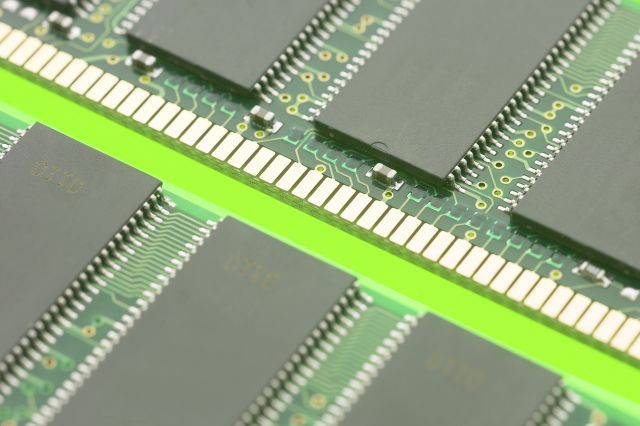
Chips

Our company has a piece of software that was built in the nineties using C++, designed for Windows 3.x and still to this day refuses to accept which century it’s in.  Most customers, and presumably their accountants don’t notice (or perhaps care about) the date on their invoice.

Last month we sold glass, according to the invoice dates, on the very day in 1912 the Titanic sank.

Standard
Design, Tech, Typography

Edits – A Beautiful Online Magazine

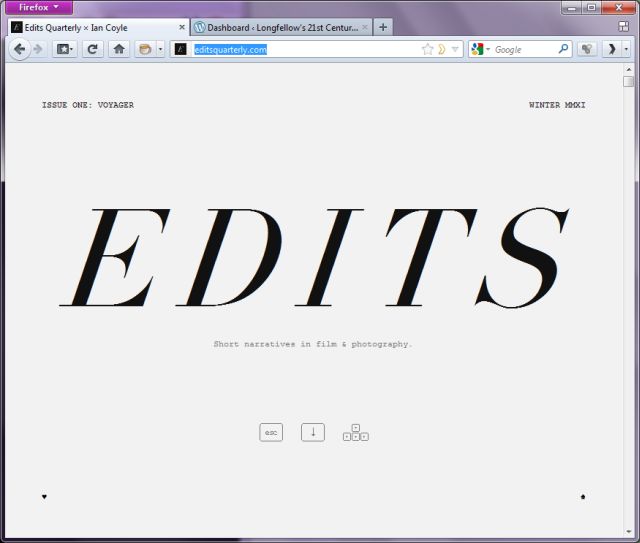
Edits Magazine Front Page

Gizmodo UK reported a few months back about an online magazine about photography that is unlike any other and I’ve been meaning to post about it on here as it is very much a pointer to how digital magazines should embrace the possibilities of the technology.

Edits Quarterly, by Ian Coyle, doesn’t try to recreate the look and feel of a paper magazine, you simply scroll down it, or rather the images and pages smoothly, seamlessly slide upwards revealing the next article.  The use of typography is wonderful, the imagery striking and the articles are superbly written.

It is a truly innovative and beautiful publication.

[Edits via Gizmodo UK]

Standard
Society, Tech

Pay Attention People

Heads up

Heads up (Photo credit: Brett Jordan)

A couple of years ago I was on my way home from work, it was December, raining, cold and I’d just walked two miles.  I was just approaching my street when a loud group of youths came walking the other way down the narrow path which was separated from the road by a railing.  Most of the group passed by me except one lad who was busy texting on his phone, not looking where he was going.  I walked as close to the wall as I could and he passed by.

The next thing I know this lad is shouting at me about how I should look where I’m going and that I nearly knocked his phone out of his hand, I carried on walking while he continued to rant, apparently about how important and the centre of the universe he was and that I should have moved for his lordship.

Having had a really lousy day I turned, walked back and firmly told him that it was him not looking where he was going and was only looking at his phone – “yeah, cos I’m busy” he replied – working on a multi-million pound equity deal no doubt – while his friend held on to him and his girlfriend crowed “it’s not wurf it mate” to me.

I agreed with that at least so turned and carried on walking.

It turns out that this condition afflicts many people these days – the inability to move from one place to another without tweeting or updating facebook – so much so that in New York signs have been put up to try to prevent collisions in future.

The signs are actually the work of street artist Jay Shells who campaigns for better social etiquette and whose previous works have included signs about not flicking cigarette butts on the ground.  Of course it’s not just pedestrian collisions that happen because of people not watching where they’re going, people have actually been hit by vehicles too so the message is serious.

So mind where you’re walking out there and if you’re reading this on the move for goodness sake LOOK UP!

[Metro]

Standard
Tech

Future Computing – Gestures in Thin Air

A comparison between a Eee PC 900 and a 22 inc...

LCD monitor and a standard keyboard. (Photo credit: Wikipedia)

After giving the world intuitive, natural game control with Kinect’s position sensing technology – and all the Star Wars Brrzz, Brrzz Lightsabre action that goes with it.  Then also adding voice control to your Xbox at the same time, Microsoft research continues to bring us closer to a scifi world of computer interfaces by using sound to detect gestures and control your desktop PC.

The new technology, which is still early in development, uses the doppler effect, bouncing ultrasonic waves off you and detecting their return times to detect hand movements for scrolling screens and even detecting your presence as a security measure.  Demonstrations at this stage are impressive and it is another step toward intuitive interfaces.

There’s still a place for the keyboard and mouse for the moment but soon your PC will sense your motions, see you, know who you are and hear what you’re saying to it.  Just don’t let it control your front door or you might have to be careful what you say in front of it.

[Gizmodo UK]

Standard
Design, Meta, Tech

Traditional From Modern

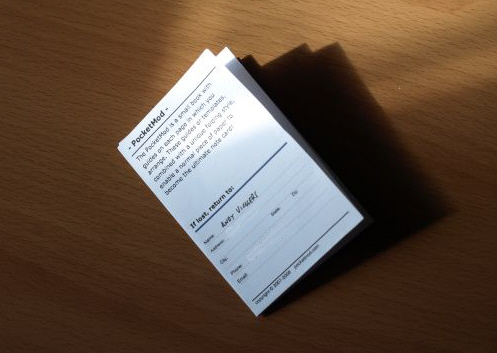
My PocketMod

I forget things, regularly.  I also find that I want to make a note of something I need to buy or do but haven’t got access to either paper or a computer.  I have found the solution to both these issues in a website.

Huh?  I hear you ask.

Ok, the solution is in the picture above, it’s called PocketMod and I’ve known about it for some time but kept forgetting to make one.  And that’s not actually a pun either.

PocketMod is a origami-style notebook that is folded, after you’ve printed and trimmed it, to form a small notebook without the need for staples or glue.  It’s been around a while and the website contains templates to print out and  very good flash-based designer tool that lets you put together your own mini notebook with exactly the pages you need – including lines, diary, squares, formulas and emergency information about you.

Put your mobile number on it and someone can contact you if they find your wallet, and you can easily find your own number too.

Just need a small pen now…

Standard
Tech

Normal Service Will Resume Shortly

Information overload

Information overload (Photo credit: Martino!)

This blog is just over a month old and it’s not been the best month to start something this time-consuming.  I have also found though that although I have plenty of ideas for articles most of them require a bit of research and source material and this is where I found a problem.

I have thousands of bookmarks in Firefox and lists of information in various places but no cohesive structure to tie it all together so at the moment I’m doing my best headless chicken impression to copy all these various sources of information into one place and this is where modern technology comes into its own again.

I realised a few weeks ago that an elephant could help me.

Before you ask what I’ve been smoking this elephant is the logo of Evernote whose collection of apps for just about any platform and even a webapp that I can access from work or any other computer is making this task of organising my virtual box of scraps of paper manageable.

I have notebooks containing whole articles or collections of notes or links to webpages that will become articles while other notebooks contain information on wider subjects that will be useful for many articles or books.  All these notebooks can be grouped together to organise things further and pages in one notebook can be linked on other pages so you can create webs of information in one place, ready to be pulled together, mixed vigorously and foisted onto the web, baked to perfection like a chocolate gateaux.

Combined with resources such as search engines and online encyclopaedias this ability to connect, sort and utilise the huge amount of information at our fingertips is one of the true 21st Century wonders.

Standard
Tech, Typography

Keeping it Less Real

Windows 3.0, released in 1990

Windows 3.0, released in 1990 (Photo credit: Wikipedia)

If you’re old enough to remember the Windows 3.0 era then you’ll remember the heady excitement we felt of having real on-screen 3D buttons that moved in and out when clicked, giving a real sense of interaction.

This inevitably grew as hardware and software improved and soon we were greeted with music players that looked like real life stacking audio centres, photo tweakers designed for home use that sprouted all kinds of curves and colours, buttons and switches designed to make them look like the kind of futuristic handheld device we’d all be using to edit our digital photos in the 21st century.

Today this kind of effect is a doddle for modern computers but is it really necessary any more?  This is the current argument in interface design, or rather user experience (UX) design as it’s known now.

Back then computer interfaces were grey, cold, businesslike and the “realistic” apps were generally for more leisure based activities like editing photos at home, listening to music, watching movies and so developers made them more familiar and more friendly looking for the home users by emulating the physical interfaces people were generally used to, even if some of the designs could be, erm, bright, colour-scheme wise, looking like the result of a focus-group based on a primary school art class.  Even Windows XP went all technicolour in an attempt to escape the greyness.

However as computers have become more a part of our lives and more people are becoming accustomed to using web pages and modern shiny system like Windows 7 and OSX these imitations of the physical world on the 2D screen have, in places, started to look gimmicky.  Do users interact more easily with an iPad notebook app if it has a fake leather cover and bindings down the side?  Some people think so while others feel that the future is a “digitally pure” interface which presents information in a clear, at a glance manner without the need to emulate something real, after all you can see that you’re holding a little computer in your hand why does screen space need to be used up with decoration?

Fans of skeuomorphic apps (as these imitations of physical objects are called) say that the visual cues like Apple’s leather binding on the edge of its contact book app or the faux paintbrushes at the edges of many photo editors help to differentiate different apps for novice users and make the phone or computer easier to navigate.  Opponents point out that it’s the content that people will look at and recognise, knowing that a list that contains Aunt Mable is likely to be either Contacts or Facebook but they’re unlikely to think “I don’t know anyone called Amy Winehouse.”  Therefore clear, accessible and usable content is the thing.

As mainstream interface design moves away from the skeuomorphic we’re starting to see more emphasis on usability – toolbars containing elements other than buttons and sliders now that they’re not pretending to be the control panel of a 747 – on-screen dialogs in programs that adapt and flow, presenting a page of dynamic information and choices rather than a panel of switches.  3D effects are toned down to simply hint at the boundaries of the bit you’re meant to click on.

Pure digital has it’s advantages that skeuomorphism can’t compete with, after all if you pretend to be a notepad you have to live with a notepad’s physical limitations.  Perhaps there’s an element of the current trend for minimal, clean lines in design rather than bling but as long as it’s not taken too far this can help to improve usability.

Imitating the real still occasionally has a place, like the satisfying animated page turn when using an ebook reader but the tide is turning and designers are realising that modern purely digital interfaces don’t have to be boring and grey, that by utilising typography, colours, shapes and icons they can be vibrant, interesting, and have a life, and identity, of their own.

Standard
Bag Fiend, Bags & Storage, Tech

Bag Fiend: When is an iPhone Case Not an iPhone (Only) Case?

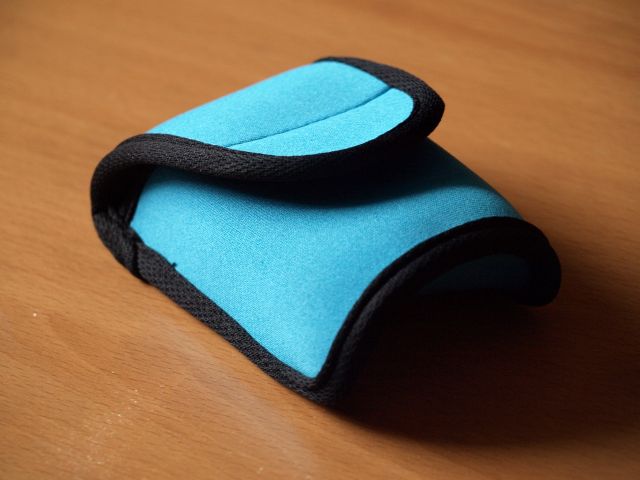
Neoprene Case

When it’s a generic neoprene pouch being sold specifically as a “Neoprene iPhone Case” but is useful for so much more.

The pouch isn’t in any way iPhone specific (I bought it to stow a  mobile mouse in my messenger bag) but is still marketed as such.  It’s a very good pouch though, by the way, for all you fellow bag collectors out there.  Really nice colour, well padded, velcro closure and available at 99p stores for just 99p, surprisingly.  (Tip – my local store has Fabulous Bakin’ Boys Lemon Cupcakes – box of 8 for 99p so grab some of those too).

The way it’s sold though is part of an interesting trend.  Products that are non-specific being sold as “for iPhone” including cases, car mounts, headphones, cleaning cloths.  Presumably this targeting happens because of iPhone being a very well-known brand name but it becomes self-perpetuating whereby people see all the accessories specifically for iPhone and decide that maybe they should get an iPhone rather than one of those other phones because of all the accessories.

Something to ponder in a later post I think.

Standard
Society, Tech

Global Community Spirit

Football (Soccer ball)

Football (Soccer ball) (Photo credit: Wikipedia)

Our world was said to have become smaller when Jet travel arrived, and it has continued to shrink it seems thanks to modern communications.  This recent story of an epic journey, widely reported around the world shows a global equivalent of finding your neighbour’s football in your garden.  Literally.

David Baxter, an Alaskan radar technician found a signed football washed up on a beach and rather than just thinking “that’s a nice ball, I’ll keep it” he considered it may have been swept away during the Japanese tsunami.  His japanese wife, with the help of a reporter in Japan have managed to trace its owner and will soon be reuniting the ball with sixteen year old Misaki Murakami who is understandably delighted to be getting his prized possession back after losing everything in the devastating floods of last March.

(Guardian via Gizmodo UK)

Standard