Bag Fiend, Bags & Storage, Gadgets, Tech

Bag Fiend – Confessions of a Bag Addict

Lowepro Terraclime 50

Ok, here and now I admit that I have a thing about portable storage.  There, I’ve said it.

I have over the years needed bags for carrying my lunch to work, computers, cameras and clothes but also many smaller bags and pouches to keep things organised and safe when in other bags or drawers.  Often though I’ve had a couple of bags before I’ve found The One for a particular task.  Sometimes I’ll get a new bag simply because I’m bored with the colour or style of the old one, or it’s becoming a bit tatty.

I do insist on quality of materials and construction and what does get my attention are good features such as  good internal storage and maybe some innovative pocket or pouch like the little slide-out memory card holder on my Lowepro compact camera and SLR holster cases.  The bag also has to look good too, colourful if possible.

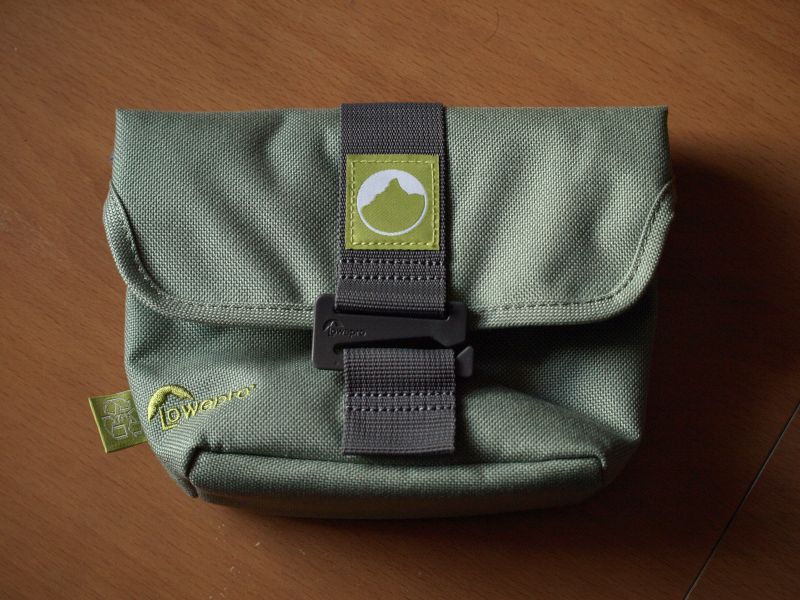
The thing is though that I am patient and I generally only buy a new bag when I can get a good deal on it.  Like today’s new bag.  A local camping shop is closing down unfortunately but they were selling off lots of Lowepro Terraclime camera pouches for a couple of quid each.  I have a use for one so I added it to my collection and an excellent bag it is too.  Good looking, colourful and made from quality, sturdy, recycled materials and featuring a retainer that slides into a loop to hold it closed along with being designed so that the top opening folds over to close it fully and keep the elements out it’s a really nicely made bag.  The interior has a soft lining and pockets for memory cards and the like.

Now to find somewhere to store it.

(Lowepro)

Standard
Tech

A Syncing Feeling

Cloud Computing Image

(Photo credit: Wikipedia)

Some may be forgiven for thinking that The Cloud was something Apple invented due to the high-profile launch of iCloud – it’s much touted system for sharing content seamlessly between iDevices and Macs – but it was a ‘thing’ long before it was an ‘iThing’.

The ubiquity of internet connectivity has enabled cloud computing to blossom in recent years.  Now there are the online file storage and sharing services like  Box, Microsoft’s Skydrive and others; cloud disk drives like that provided by Dropbox (and the upcoming file system integration of Windows Skydrive); and automatic content syncing systems like iCloud.

The ultimate goal of cloud computing is beyond such storage and syncing of files and moves all of your apps and data onto remote servers operating in a similar way to the thin-client terminals that those of us old enough remember fondly.  Google’s ChromeOS running on ChromeBook laptops are the first foray into this new world however they assume a mostly connected situation and online OSes and apps won’t be replacing Windows, MacOS and desktop apps anytime soon though their features and functionality are improving all the time.

The most useful aspect of the cloud for me so far has been syncing of data.  To be able to add an item to my to-do list on either my laptop, netbook, tablet or, using the webapp, my work laptop and know that it’ll be there when I fire up one of the other devices is a joy.  My app of choice for this is Wunderlist but others have similar functionality.  (I also use the similarly syncable Evernote for more in-depth notes).  The same is true of having files I use on the laptop synced via Microsoft’s servers to my netbook whilst being simultaneously backed-up in the cloud as well.

The future may not be entirely based in the cloud but in huge server farms cooled by Arctic fjords our data will be shuffled between our devices and shared with our friends, seamlessly and effortlessly.

And I won’t have any excuses for forgetting to do something on my to-do list.

Standard
Blog on The Landscape, Tech

Blog on the Landscape – 21st Century Windmills

English: Modern wind energy plant in rural sce...

English: Modern wind energy plant in rural scenery. Français : Une éolienne moderne dans un paysage rural. (Photo credit: Wikipedia)

In front of me is a window with  a view of a slice of countryside beyond the river.  At the right side of that slice, at the edge of a low hill appeared, last week, a white mast and eventually the three, apparently delicate feather-like blades of a compact wind turbine.

It’s one of three that have been put up locally this year and all are individual turbines, not wind-farms, and all appear to have the purpose of supplying farms with power in a modern analogue of the many windmills that farms had centuries ago to grind their corn and often power machinery.

I’m certain that there will be people around here who will have written angry letters to the council complaining about them being blots on the landscape and I wonder whether similar arguments happened when farmers started building windmills (despite their admitedly lower altitude).

While I admit that the larger wind-farms are not attractive and there are certain landscapes in this country that would be ruined by even a single blade sticking up into the view smaller individual turbines like the one I can see now are not ugly in my opinion and their gracefully turning blades can add a certain modernist beauty to relatively featureless landscapes, a blending of the old and the new to remind us that we do live in the 21st century and times move on as they did when the revolutionary new wind powered milling wheels ground their first corn.

Standard
Tech

NFC: No thankyou

Using a TaiwanMoney ticket checker smartcard r...

(Photo Credit: Wikipedia)

If I’d told the banks, when I first saw their ads for contactless cards last year, that not having any authentication whatsoever (like a PIN) was a bad idea then I’d be saying “told you so” now.

Initially I thought that the ad with the chap on a waterslide waving his card at the till was a bit of artistic license but no, you don’t have to type a number or anything, which made me think if I only have to swipe past the reader what’s to stop someone swiping a reader past my card?

And of course that has now been found to be possible, especially since the advent of NFC equiped mobiles that unscrupulous types can simply load an app onto.  As an aside this also provides more evidence for Apple’s defence of its walled garden approach to app purchasing as such apps could only be loaded onto so-called jailbroken phones (either Apple or Android).

Either way it’s an issue that many besides myself saw coming and it’s surprising that the card companies didn’t even seem to consider it to be a problem and still don’t, stating that the information retrieved can’t be used (at least online or in a customer-not-present transaction) without the CV2 code, this doesn’t answer the question of whether this information can be put on a blank card and usedthat way, as a contactless card.

There are, however, patents in process for systems that prevent this kind of theft, like one that is simply a touch switch that only enables the NFC chip when you have the card in your hand which is a much better solution than the only current protection which is to slip your card into a shielded sheath.

Remember to practice safe card use people.

Standard
Tech

Keyboard Fail

Keyboard Fail

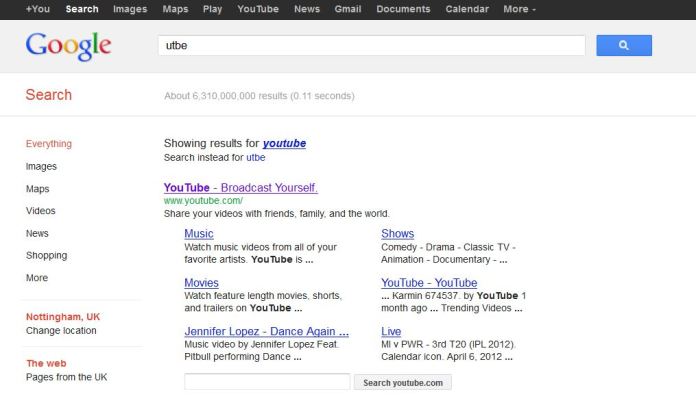
This is a good demonstration of how Google’s algorithms work. I tried to type youtube into Firefox’s address bar but typed it into the search bar instead, except that my wireless keyboard was having an off day and I only typed utbe. The result, “aw, you meant youtube, didn’t you”.

Yes. Yes I did. Google, stop looking at me like I’m stoopid, it was my KEYBOARD OK.

Standard