Design, Gadgets, Tech

Personalised News

English: A simplified version of the RSS feed ...

English: A simplified version of the RSS feed icon.  (Photo credit: Wikipedia)

Sometime in the late nineties I wrote a sci-fi story and in one scene a man gets home, taps a touchscreen on the wall of his kitchen and instantly brings up a personalised news feed programmed to display things that interested him and also set up to specifically look for news items featuring certain keywords, to highlight any news about a specific ship in this case.

Now just a bit over a decade later I’m just getting to grips with this exact same thing on my own personal tablet computer, though without the spaceship captaining wife.

Websites, including these WordPress blogs, can provide what is called an RSS feed which summarises each article published and these can be picked up by reader apps.  These have been around a long time admittedly but these readers are now becoming more sophisticated and stylish.  On my Nexus 7 I have tried Google Reader, Flow Reader, Google Currents, Flipboard and Feedly.  Some apps actually access your Google Reader subscription list to find out which feeds you want to receive.  You can even view other RSS equipped sites in your WordPress reader.   The icon above signifies that a site has an RSS feed.

These apps are the solution to the at time overwhelming volume of information that can come at you from the internet.  This sheer volume of articles is one of the reasons why I sit down to write something for this blog and just decide to have a mug of tea and watch tv instead, I just don’t know where to start.  With an RSS reader on a phone or tablet I can skim through articles, share useful ones to Pocket for use later on my desktop PC and read anything that I can just enjoy in the moment – all while half-listening to the tv.

The nice thing about these modern readers is the way they present the content.  You can filter what you see so if you have a news website’s feed you could refuse to acknowledge the existence of articles about X-Factor winners or only view articles about the weather or Wills and Kate.  Then depending on which app you choose you can have a list of your incoming torrent of news, divided into subject if you so wish or displayed to you as a virtual, stylish, one of a kind digital magazine, or a mixture of both.  Of course as it’s tablet/smartphone based (although you can use PC RSS readers or websites too) you can have notifications.

The future of news, personalised and delivered to your sofa.

Standard
Design, Gadgets, Tech

Past Time

Longines pocket watch

Longines pocket watch (Photo credit: xddorox)

A piece by David Yanofsky on the Quartz site recently highlighted a trend that I’d not thought about but I now realise I do and a few people I know do too.

Mobile phones have become the modern equivalent of the pocket watch.  I still always wear a wristwatch, most of the time when I need to know the time locating my phone would take too much, time.  But when I’m in a pub I’ll pull out my phone to check the time rather than look at my watch for some reason – though probably it’s more an issue of visibility in some places.

The article goes on to suggest that as phones increase in size and complexity this is not a good habit to get into as retrieving devices from pockets and bags is inconvenient and that tech companies are already eyeing up the wrist real-estate vacated by ticking timekeepers and replacing them with smartwatches which will keep track of your messages, calls, fitness, reminders, oh and tell the time while your phone stays tucked away safely somewhere on your person.

An interesting idea, true, but I like my analogue watches (yes, I collect them too) and if I don’t want to look at what my phone is trying to tell me I can leave it where it is – even if it is on the shelf, at home, because I forgot it.

[Quartz]

Standard
Architecture, Art, Design, Food, Gadgets, Science, Tech

Print Anything

3D Printed Cells Bowl - Math Art by @Dizingof

3D Printed Cells Bowl – Math Art by @Dizingof (Photo credit: Dizingof)

And I mean anything.  Trust me.

Whatever new technology comes along someone will use it, or combine it with something else, to create something unique.  And this is true of 3D Printing.  The technology has been around for a while, used by designers and engineers to create prototypes and demonstrations for shows, and has now matured to the point where desktop and portable devices are soon to be available although some, like the Kickstarter-funded Formlab Form1 have come up against patent issues that are ongoing.

The idea, of slowly producing three-dimensional solid objects layer by layer by laying down material one layer on the next or selectively laser-fusing or curing liquids to form the layers, at the moment produces solid parts that can be assembled like an Airfix model kit but there has also been an intriguing chocolate 3D printer which could prove popular too. Already there are online archives of things to download and print from models of the Eiffel Tower to AK-47s – as I said, someone will always find a use for such tech.

The hope is that in future the technology could combine multiple materials in a single object, extending the technique beyond plastics and further improving the detail achievable although at the moment the printers can create tiny details, and even using the materials to replace structures like steel beams.  One amazing use is a device called a 3D Bio-Printer that can print out a hybrid natural-synthetic cartilage which once implanted acts as a support for natural tissue to regrow.

Which medical miracles brings us to two Japanese uses for the technology:  firstly a 3D photobooth that can scan your body and create a plastic mini-me, perfect for those who are so into model railways they want to be in their model railways, and secondly Fortean Times this month (FT297 pp10) reports on a clinic in Tokyo that uses a “Bio Texture” process and MRI scans to give parents-to-be a chance to see and hold their baby months before birth.  The “Shape of an Angel” service is £800 plus the cost of the MRI scan.  Imagine the scene, a family get-together, the baby photos are brought up on the wall projection to embarrass the teenager as parents sometimes do…   “This is you when you were five… ah, when you were two… look, you were only a few hours old there…  go get the box…  this was you when you were minus three months”.

Standard
Gadgets, Society, Tech, Work

Adventures With a Chinese Android

It all started eighteen months ago…

Cheap, small, curvaceous but not as slender as more expensive models my droid arrived late and wasn’t quite what I’d ordered…
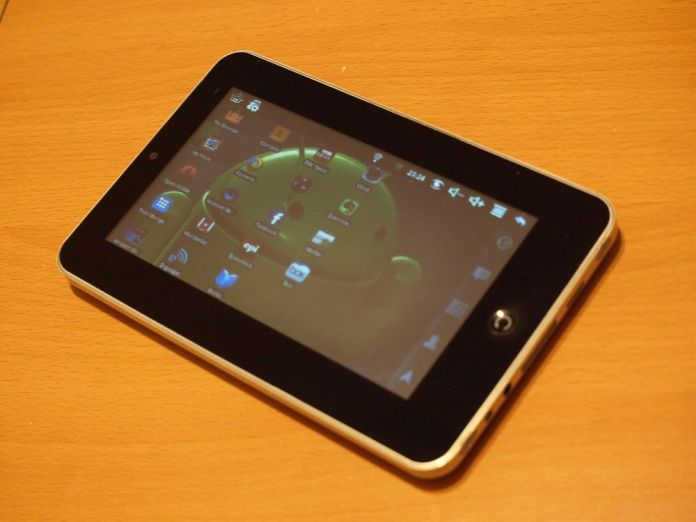
Chinese Android

Chinese Android (image credit: Andy Vickers)

The picture showed a proper USB port, this didn’t have one but never mind.

I’d been contemplating a tablet computer for a while but wasn’t sure I’d get much use from one so I didn’t want to splash out on a Samsung or Asus I might regret getting.  I could see the advantage of a handheld, touchscreen computer for web browsing, picture and video viewing, quick email or Facebook viewing and so on especially since Apple and Google had managed to make operating systems that suited the way people would use them, i.e. with fingers, and because unlike previous tablets they ran smartphone software not desktop software they could be smaller and lighter.

My MID Epad looked like a shrunken iPad and even came in a very nice, Apple-esque box with a magnetic closure and it was packed with technology that iPad owners would snigger at; old-fashioned resistive touchscreen, an old processor, little memory, low-res screen, plastic back – PLASTIC!  Short battery life.  Not being a perfectionist and being careful financially with such experiments I accepted that what I had wasn’t cutting edge, so far from cutting edge in fact that you could butter bread with it.  Anyway, it was quick enough to play videos, the screen responded well enough to flick through ebooks.  I could even play Angry Birds.

The first problem was that these tablets come with Android but are not approved by Google so can’t access many of the apps in the Play Store, the default Google apps such as the contacts app won’t synchronise properly and often you don’t get updates.  For some these are not problems, if all you want is to browse and get email and read ebooks.  Gizmodo UK recently proclaimed that chinese tablets were all “crappy” and that Google was having to keep Android open to support this flow of effluent but it depends on how you define crappy, what you find acceptable and whether you’re looking at your £65 tablet from the point of view of a well paid tech journalist, someone who just wants to look at the odd web page or a blogger on the minimum wage.

It niggled me admittedly but again I lived with it and was able to get round the issues in a way that isn’t possible with out of the box Apple devices – I put apps on manually, sideloaded them, having downloaded them from app sites.  Most were old versions and again they wouldn’t get updates.  Playing videos from the computer required some research on how to make the software access a shared network drive, though as usual the net provided excellent step-by-step guides, though if anyone mentions the word Samba near me I may cry.  Ok, so it didn’t “just work” as certain fruity products are supposed to do but as a bit of a geek it was interesting.  The hair I pulled out has grown back.

It was a challenging device all in all – it had to be charged after a couple of hours use so I had to make an adaptor lead so I didn’t have to sit two feet away from where the power supply plugged in and so I could have a right-angle plug into the device.  Sometimes the internet browsing was painfully slow.  I loved reading books on it, even using it in a tent in the middle of the Lake District until the battery died again, though using it outside in sunlight was out of the question – one-nil to Kindle and paper.  Being non-approved some of the apps I wanted I just couldn’t have, and the dream of sharing data across computer, phone and tablet would have to wait a while.

The more I used it though the more I saw that the arguments of those people on gadget blogs who complained that tablets were too simplistic, that you “can’t code on them”, and so on were wrong.  The tablet is the perfect consumption device, I can lounge on the sofa and read the news, read a book, browse a website, check mail, listen to music or watch video streamed from my computer, I even have apps filled with tasty recipes which I haven’t yet got round to cooking.  I can share things I’m interested in there and then, add to my read it later.

Now, of course, this is well known and Kindle Fires, Nexus 7s and iPad Minis have been this years big Christmas gift – my mum got a Kindle Fire for her birthday last week because it was the perfect computer for her; so simple to use, just point and tap to read, browse the net or get more books or games.  I now have an Sony Xperia Android smartphone and a Nexus 7 tablet myself, both have newer versions of the software, I can listen to music via bluetooth from either and do even more than with my Chinese Droid, my emails, contacts, to do lists, notebooks, reading lists and bookmarks are automatically synced and available wherever I want them, all from small, thin light devices.

I remember seeing 2001: A Space Odyssey, Star Trek and similar, seeing those little pads of information and thinking how great it would be to have all that in your hand.  And it is.  Amazing.

Standard
Gadgets, Music, Tech

HBCD

Compact Disk

This could make me feel old but I’m not going to let it.  This year the CD celebrates its thirtieth birthday.  I was seven when I watched the famous demonstration on Tomorrow’s World of how you could spread jam on it (clean it off) and it would still play.  They didn’t mention that it you cleaned it with anything more scratchy than a swan’s tail feather and then played it in a less than perfect CD player it would skip more than, oh I don’t know, a bush kangaroo.  But in those early days Sony and Philips’ shiny new disc and player were the future of high quality, high fidelity digital music in a time where computers still had mono screens and games consoles still had faux-mahogany cases.

Today MP3 downloads and streaming services like Spotify are said to sound the death knell for CDs, like those same hypnotic discs were meant to do for vinyl.  I still buy most of my music on CD because I like the experience of getting a new album, opening the case, putting it in the CD player and listening to it all the way through while looking at the booklet.  Once it’s on the computer it’s all to easy to skip tracks and shuffle it with all the other albums.  But then I’m the same with books.  Sales may fall but I’m sure there will be plenty of people like me willing to buy them for some time still.

So happy thirtieth you little iridescent disc you, many happy returns, or should that be repeats.

Standard
Bag Fiend, Bags & Storage, Gadgets, Tech

Bag Fiend – Confessions of a Bag Addict

Lowepro Terraclime 50

Ok, here and now I admit that I have a thing about portable storage.  There, I’ve said it.

I have over the years needed bags for carrying my lunch to work, computers, cameras and clothes but also many smaller bags and pouches to keep things organised and safe when in other bags or drawers.  Often though I’ve had a couple of bags before I’ve found The One for a particular task.  Sometimes I’ll get a new bag simply because I’m bored with the colour or style of the old one, or it’s becoming a bit tatty.

I do insist on quality of materials and construction and what does get my attention are good features such as  good internal storage and maybe some innovative pocket or pouch like the little slide-out memory card holder on my Lowepro compact camera and SLR holster cases.  The bag also has to look good too, colourful if possible.

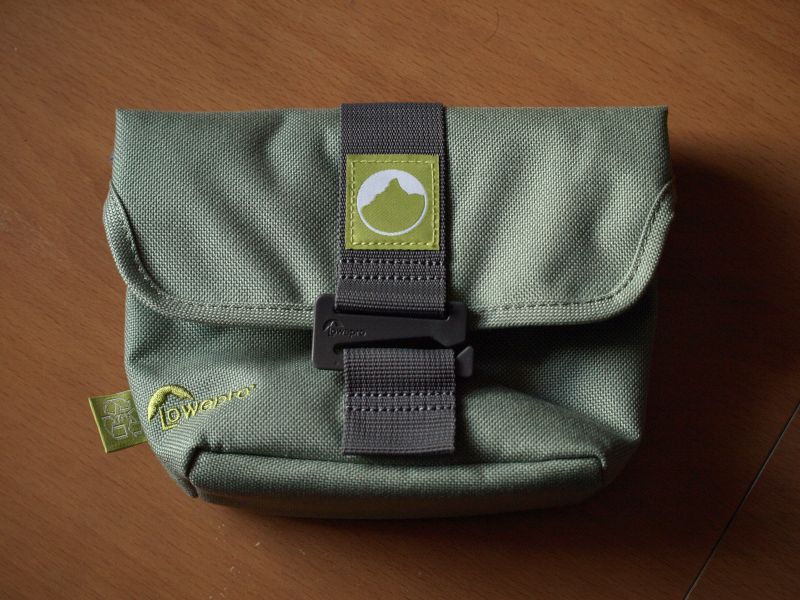
The thing is though that I am patient and I generally only buy a new bag when I can get a good deal on it.  Like today’s new bag.  A local camping shop is closing down unfortunately but they were selling off lots of Lowepro Terraclime camera pouches for a couple of quid each.  I have a use for one so I added it to my collection and an excellent bag it is too.  Good looking, colourful and made from quality, sturdy, recycled materials and featuring a retainer that slides into a loop to hold it closed along with being designed so that the top opening folds over to close it fully and keep the elements out it’s a really nicely made bag.  The interior has a soft lining and pockets for memory cards and the like.

Now to find somewhere to store it.

(Lowepro)

Standard